













How to Run KKPoker on Mac Using CrossOver (Complete Guide)

Updated: Sep 9
This guide is based on my own testing after trying multiple solutions, including VMware Fusion and Android emulators, before finding a working CrossOver configuration.
If you want to play KKPoker on macOS, the best solution I’ve found is CrossOver.
I first tested a virtual machine using VMware Fusion, but performance wasn’t ideal for multi-tabling. CrossOver was much smoother, although I ran into one frustrating problem:
KKPoker installed correctly but wouldn’t launch.
Here’s the complete fix.
✅ Works on Apple Silicon Macs
✅ No Windows installation required
✅ No Android emulator required
✅ Supports the Windows desktop client
✅ Better for multi-tabling than BlueStacks
Update (June 2026)
Most online guides recommend using an Android emulator such as BlueStacks to play KKPoker on a Mac.
While that approach works for the mobile app, this guide shows how to run the Windows desktop client through CrossOver instead, allowing a smoother experience for players who prefer desktop play and multi-tabling.
Why Most Guides Tell You to Use an Android Emulator
If you search online, most guides recommend BlueStacks or another Android emulator.
While that works for the Android app, it doesn’t give you access to the Windows desktop client that many grinders prefer.
If your goal is multi-tabling on a Mac, CrossOver is a much better solution.
KKPoker on Mac: Which Method Should You Choose?
Method | Desktop | Multi-Tabling | Best For |
Android Emulator | ❌ No | Limited | Casual players |
VMware Fusion | ✅ Yes | ✅ Yes | Players who already use VMs |
CrossOver | ✅ Yes | ✅ Yes | Best desktop experience |
Step 1 – Install CrossOver
Create a new Windows 11 Bottle (or another Windows bottle if you prefer).

Step 2 – Install KKPoker
Inside your Bottle:
Click Install Application
Select the KKPoker installer
Complete the installation normally
The installation should finish without any errors.
CrossOver will automatically create a launcher, but in my case it didn’t work.
Step 3 – Run KKPoker Using Run Command
If KKPoker installs successfully but refuses to launch, don’t reinstall the client.
Instead:
Open your CrossOver Bottle.
Right-click the Bottle and select Run Command.
In the Command field, enter the full path to the executable including the launch argument.
For example:
"/Users/YOUR_USERNAME/Library/Application Support/CrossOver/Bottles/Win 11/drive_c/Program Files/KKPoker/KKPoker.exe" --in-process-gpuReplace:
YOUR_USERNAME with your macOS username.
Win 11 with the name of your CrossOver Bottle if you’ve used a different one.
Click Run.
In my case, KKPoker launched immediately. The login screen appeared correctly, the lobby loaded without any issues and the client worked normally.

This is the exact command that solved the startup issue during my testing.
Step 4 – Save the Launcher Permanently
Once you’ve confirmed that the command works:
Open Run Command again.
Leave the exact same command in the Command field.
Click Save Command as Launcher.
CrossOver will create a permanent launcher using the same command, so from that point onward you can simply click the launcher and KKPoker will always start with the correct launch argument.
There’s no need to enter the command again after creating the launcher.
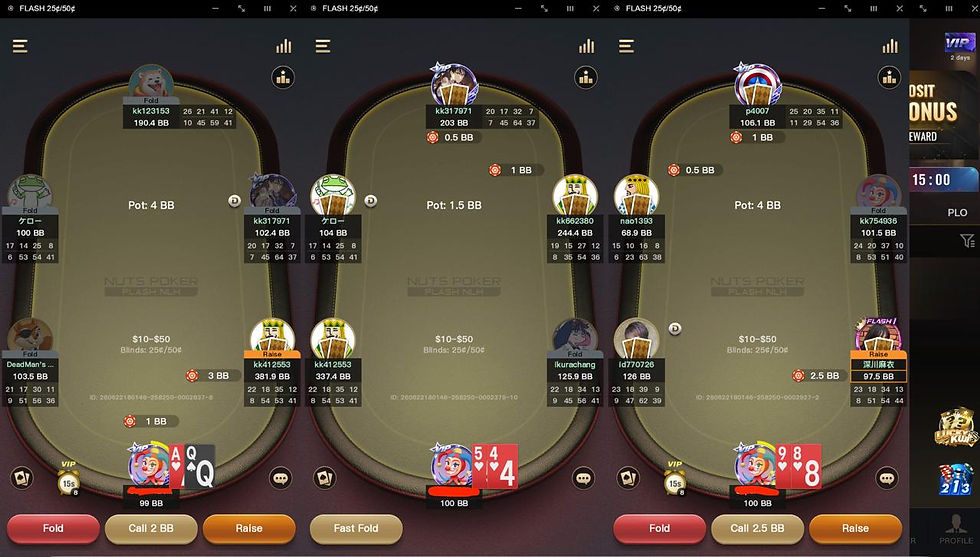
Note: The screenshot below shows the setup using NutsPoker, one of the largest skins on the KKPoker network.
The procedure is exactly the same for both KKPoker and NutsPoker—simply replace the executable path with the client you’ve installed. Once you’ve saved the command as a launcher, both clients will start normally with a single click.
If you’re planning to play on KKPoker or NutsPoker, contact The Poker Broker on Telegram before creating your account.
We can offer up to 50% rakeback, exclusive VIP rewards and additional promotions that aren’t available through the standard registration process.
Performance
I also tested a Windows Virtual Machine using VMware Fusion before trying CrossOver.
Although VMware worked, the client felt noticeably slower.
After switching to CrossOver and launching KKPoker with the --in-process-gpu argument, performance improved significantly, especially when opening multiple tables.
For me, this is currently the best way to run KKPoker on macOS.
Does This Method Work With Other Poker Clients?
Yes.
After successfully testing this setup with KKPoker, I also confirmed that the same CrossOver method works with PPPoker.
Since both clients are built on a similar technology stack, the solution is identical:
Install the Windows client in CrossOver.
Launch it using the complete command shown in this guide.
Save the command as a permanent launcher.
If you’re using PPPoker, simply replace the executable path with the PPPoker executable installed inside your CrossOver Bottle.
As I test additional Windows poker clients, I’ll continue updating this guide with compatible software.
Final Thoughts
Although KKPoker doesn’t offer a native macOS client, running the Windows version through CrossOver is surprisingly straightforward once you know the correct configuration.
In my case, the installation itself was never the issue. The missing step was launching KKPoker.exe through Run Command with the --in-process-gpu command-line argument and then saving it as a permanent launcher.
Once configured, the client ran smoothly and provided a significantly better experience than using a traditional virtual machine.
If this guide helped you get KKPoker running on your Mac, you’re ready to start playing.
Get 50% Rakeback on KKPoker or Nuts Poker
Before creating your KKPoker or NutsPoker account, make sure you claim the best available deal.
Players who register through The Poker Broker receive 50% rakeback, exclusive VIP benefits, additional promotions and dedicated support that aren’t available through the standard registration process.
Contact us on Telegram before signing up to activate your 50% rakeback deal and make sure you’re getting the best offer available.
Frequently Asked Questions
Does KKPoker have a native Mac app?
No. KKPoker currently doesn’t offer a native macOS desktop client. However, you can run the Windows desktop client on your Mac using CrossOver without installing Windows or using a virtual machine.
Can I play KKPoker on Mac without BlueStacks?
Yes. Most online guides recommend Android emulators like BlueStacks, but those only run the Android version of KKPoker. This guide shows how to run the full Windows desktop client using CrossOver, which provides a much better experience for desktop players.
Does this method work on Apple Silicon Macs?
Yes. During my testing, this method worked successfully on Apple Silicon using CrossOver. It should also work on Intel Macs using the same procedure.
Why won’t KKPoker launch after installing it in CrossOver?
If KKPoker installs correctly but doesn’t launch, the issue is usually the way the application is started. Running the client through Run Command with the correct launch command and then saving it as a permanent launcher solved the problem completely during my testing.
Can I multi-table KKPoker on a Mac?
Yes. One of the biggest advantages of this method is that it allows you to use the Windows desktop client instead of the Android app, making it much more suitable for multi-tabling.
Can I use the same setup for NutsPoker?
Yes. NutsPoker is one of the largest skins on the KKPoker network, and the setup process is exactly the same. Simply launch the executable for the client you’ve installed and save it as a permanent launcher in CrossOver.
Does this method work with PPPoker?
Yes. I successfully tested the same CrossOver setup with PPPoker. The installation process is identical—you simply need to use the PPPoker executable instead of KKPoker when creating the launcher.
Can I get rakeback on KKPoker or NutsPoker?
Yes. If you register through The Poker Broker, you can receive up to 50% rakeback, exclusive VIP rewards and additional promotions that aren’t available through the standard registration process.
Make sure to contact us on Telegram before creating your account, as these deals generally can’t be applied after registration.


