










The Ultimate Online Poker Grinding Setup

Updated: Oct 16

Most online poker players spend hundreds—or even thousands—of hours studying strategy.
They buy training courses, invest in solvers, review hand histories, and constantly look for ways to improve their game.
But there’s one area that many players completely overlook:
Their grinding setup.
The environment you play in has a direct impact on your comfort, focus, productivity, and even the quality of your decision-making during long sessions.
An uncomfortable chair can leave you exhausted after a few hours. A small monitor can make multitabling frustrating. Poor lighting may increase eye strain, while an inefficient desk layout forces you to constantly switch between windows instead of focusing on the game.
Whether you’re a casual player or a full-time grinder, building the right workspace can make long sessions more enjoyable and significantly improve your overall experience.
In this guide, we’ll cover everything you need to create the ultimate online poker setup—from standing desks and ergonomic chairs to ultrawide monitors, mobile poker app layouts, computers, accessories, lighting, and internet reliability.
We’ll also show you how professional players organize their screens to comfortably play both traditional desktop poker rooms and modern mobile poker apps on a single workstation.
Let’s build the perfect poker setup.

Here's is a real life example of a setup that one of our proudest and most affectionate players sent us that inspired this article :)
🃏 Table of Contents
❓ FAQ
🖥️ Choosing the Right Desk
Your desk is the foundation of your entire grinding setup.
A powerful computer and an expensive monitor won’t make much difference if you’re sitting in an uncomfortable position for six to ten hours every day.
When choosing a desk for online poker, there are three key factors to consider:
Stability
Available workspace
Ergonomics
Unlike many gamers, poker players don’t make sudden movements, but they often spend extremely long sessions in front of the screen. That means comfort and posture become far more important than flashy RGB lighting or gaming aesthetics.
Our Standing Desk Recommendations
Budget | Recommended Desk | Best For | Why We Recommend It |
💰 Budget | FlexiSpot E2 | Beginners | Excellent value, stable enough for a single ultrawide monitor, electric height adjustment. |
💵 Mid-Range | FlexiSpot E7 | Most online poker players | Outstanding balance between price, stability, lifting capacity, and build quality. |
💎 Premium | Uplift V2 | Professional grinders | One of the most stable standing desks available, ideal for heavy multi-monitor setups. |
👑 Ultimate | Herman Miller Motia | High-end professional offices | Premium materials, exceptional build quality, and long-term reliability. |
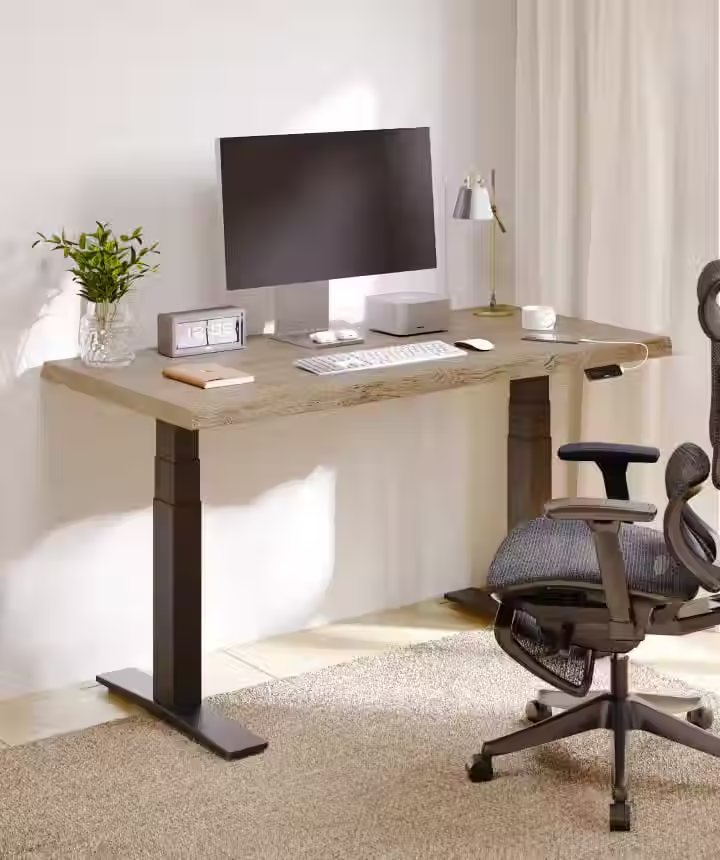
Our Pick: ⭐ FlexiSpot E7
For most poker players, the FlexiSpot E7 offers the best balance of performance, stability, and price. It’s large enough for an ultrawide monitor while remaining significantly more affordable than premium office desks.
Why a Standing Desk Is Worth Considering
One of the biggest upgrades you can make is switching to a height-adjustable standing desk.
Instead of remaining seated for an entire session, you can alternate between sitting and standing throughout the day.
Potential benefits include:
Reduced lower back discomfort
Better posture
Improved circulation
Less stiffness after long sessions
More energy during marathon grinding sessions
You don’t need to stand all day.
Many professional players simply alternate every 60–90 minutes, especially during breaks or between tournaments.
Even standing for one or two hours throughout a long session can make a noticeable difference in comfort.
How Much Space Do You Need?
Modern poker setups require much more desk space than they did a decade ago.
A typical grinding station may include:
An ultrawide monitor
Mechanical keyboard
Large mouse pad
Mouse
Laptop
Phone
Notebook
Coffee or water
Headphones
Microphone (if coaching or streaming)
A desk around 160–180 cm (63–71”) wide gives enough room for most players while keeping everything comfortably within reach.
If you plan to use a 49-inch ultrawide monitor, avoid smaller desks whenever possible.
Cable Management Matters More Than You Think
A clean desk isn’t just about aesthetics.
Good cable management makes your workspace easier to maintain, reduces distractions, and makes upgrading your setup much simpler.
Simple additions such as cable trays, under-desk mounts, and monitor arms can dramatically improve both appearance and usability.
When everything has its place, your workspace feels calmer—and that can help you stay focused during long sessions.
Minimalism Beats Clutter
One mistake many players make is filling their desk with unnecessary gadgets.
The best poker setups tend to be surprisingly simple.
Keep only what you actually use during a session:
Monitor
Keyboard
Mouse
Water or coffee
Headphones
Everything else can stay off the desk.
Less clutter means fewer distractions and a more professional workspace.
🪑 Choosing the Right Chair
If your desk is the foundation of your setup, your chair is the investment you’ll feel every single day.
Many online poker players spend more time sitting than office workers.
Grinding six, eight, or even twelve hours in an uncomfortable chair doesn’t just affect your back—it affects your concentration, your mood, and ultimately your performance.
The goal isn’t to buy the most expensive chair on the market.
It’s to find one that properly supports your body throughout long sessions.
Our Ergonomic Chair Recommendations
Budget | Recommended Chair | Best For | Why We Recommend It |
💰 Budget | IKEA MARKUS | Casual players | Excellent entry-level ergonomic chair with solid lumbar support. |
💵 Mid-Range | SIHOO Doro C300 | Regular grinders | Fully adjustable, breathable mesh, and excellent comfort during long sessions. |
💎 Premium | Herman Miller Aeron | Serious professionals | One of the most respected ergonomic office chairs ever made. |
👑 Ultimate | Herman Miller Embody | Full-time grinders | Outstanding pressure distribution and all-day comfort for marathon sessions. |
Our Pick: ⭐ SIHOO Doro C300
If you want the best value for money, the SIHOO Doro C300 delivers premium ergonomics at a much lower price than flagship office chairs, making it an excellent choice for most online poker players.

What Really Matters
Instead of focusing on gaming branding, look for features such as:
Adjustable lumbar support
Adjustable armrests
Seat depth adjustment
Breathable mesh or high-quality fabric
Adjustable seat height
Recline with tension control
These features have a much bigger impact on comfort than flashy designs or racing-style aesthetics.
Gaming Chair or Ergonomic Office Chair?
This is one of the most common questions.
While many gaming chairs look impressive, ergonomic office chairs are often the better choice for players who spend long hours grinding.
Office chairs are generally designed with long-term comfort and posture in mind, whereas gaming chairs often prioritize appearance.
For serious online poker players, comfort should always come first.
Small Adjustments Make a Big Difference
Even the best chair won’t help if it’s adjusted incorrectly.
As a starting point:
Feet flat on the floor
Knees at roughly 90 degrees
Elbows close to 90 degrees when using the keyboard
Top of the monitor at or just below eye level
Shoulders relaxed rather than raised
These small adjustments can significantly reduce fatigue over the course of long sessions.
🖥️ Ultrawide vs Dual Monitors
For years, dual-monitor setups have been the standard choice for online poker players.
They provide more screen space, make multitabling easier, and allow you to keep tracking software, browsers, Discord, or streaming tools open without covering your poker tables.
However, modern ultrawide monitors have changed the game.
Instead of dealing with bezels between two screens, an ultrawide gives you one large, continuous workspace that can be divided exactly the way you want.
For many online poker players, especially those playing across multiple platforms, this creates a much cleaner and more efficient workflow.
Why Many Poker Players Prefer Ultrawide Monitors
An ultrawide monitor isn’t just about having a bigger screen.
It’s about using your space more efficiently.
Compared to a traditional dual-monitor setup, an ultrawide offers several advantages:
No bezel splitting your poker tables
Freely customizable window layouts
Better visibility when multitabling
Cleaner desk with fewer cables
Easier mouse movement across applications
More immersive working environment
Most importantly, modern window management software allows you to divide an ultrawide monitor into multiple custom zones, making it incredibly flexible for poker.
Is a 34-Inch Ultrawide Enough?
For many players, absolutely.
A 34-inch ultrawide is an excellent starting point if you primarily play:
Cash games
Small MTT sessions
Up to 6–8 desktop tables
It also leaves enough room for Discord, HUDs, note-taking software, or a browser window.
If you only play on traditional desktop poker clients, a 34-inch monitor may be all you’ll ever need.
When a 49-Inch Ultrawide Makes Sense
This is where things become really interesting.
If you regularly play on both desktop poker rooms and mobile poker apps, a 49-inch ultrawide can completely transform your workflow.
The additional horizontal space allows you to dedicate different areas of the screen to different types of games without constantly switching between windows.
Instead of treating everything as one giant desktop, you can create separate workspaces for each platform.
And that’s where ultrawide monitors truly outperform traditional dual-monitor setups.
Our Ultrawide Monitor Recommendations
Budget | Recommended Monitor | Best For | Why We Recommend It |
💰 Budget | LG UltraWide 34WP65C-B (34”) | Casual & semi-serious grinders | Excellent value, plenty of space for multitabling, and a great entry into ultrawide monitors. |
💵 Mid-Range | Dell UltraSharp U4025QW (40”) | Productivity-focused players | Exceptional image quality, generous workspace, and ideal for multitasking beyond poker. |
💎 Premium | Samsung Odyssey OLED G9 (49”) | Serious multitablers | Massive screen, immersive display, and enough space to comfortably organize desktop clients and mobile apps. |
👑 Ultimate | LG UltraGear 49GX90SA-W (49”) | Professional grinders | Premium OLED panel, ultra-wide 32:9 aspect ratio, and one of the best displays available for high-end poker setups. |
Our Pick: ⭐ Samsung Odyssey OLED G9 (49”)
If you’re serious about online poker, the Samsung Odyssey OLED G9 offers one of the best combinations of screen space, image quality, and flexibility. Its 49-inch 32:9 format is particularly well suited for players who want to combine traditional desktop poker clients with mobile poker apps on a single display.

📱 The Best Screen Layout for Desktop Poker & Mobile Poker Apps
One of the biggest challenges facing modern online poker players isn’t choosing the right monitor.
It’s figuring out how to organize it efficiently.
Today’s poker ecosystem is very different from what it was just a few years ago.
Many players don’t grind exclusively on traditional desktop clients anymore. Instead, they split their action between classic poker rooms and mobile-first poker apps such as ClubGG, PPPoker, KKPoker, PokerBros, or QQPK.
These apps were originally designed for smartphones, which means they work best in a portrait layout, not in the traditional landscape windows used by desktop poker software.
Trying to squeeze everything onto a standard monitor quickly becomes frustrating.
That’s where an ultrawide monitor really shines.
A Layout Designed for Modern Poker
Instead of opening windows randomly across your screen, think of your monitor as two dedicated workspaces.
Left Side
Reserve roughly 70–75% of your screen for traditional desktop poker clients.
This area is ideal for:
Cash games
Multi-table tournaments
HUDs
Tracking software
Table management tools
Desktop poker clients naturally fit into landscape windows, making this section perfect for tiled or stacked tables.
Right Side
Use the remaining 25–30% of the monitor for mobile poker apps.
Instead of stacking them vertically, place them side by side.
Each app runs in a tall, portrait-shaped window, closely matching the experience of using a smartphone.
This approach offers several advantages:
Much larger tables
Better readability
Easier decision-making
Less window switching
More efficient use of screen space
If you regularly play multiple mobile apps simultaneously, this layout feels surprisingly natural after just a few sessions.
Why Portrait Windows Work Better
Most poker apps weren’t designed with desktop monitors in mind.
Their interfaces assume a tall screen.
Buttons, betting controls, player avatars, and action panels are all optimized for portrait orientation.
Running these apps in short, landscape windows wastes valuable space and often makes the tables feel cramped.
By keeping each app in its own tall window, you preserve the intended layout while still benefiting from the larger display of an ultrawide monitor.
A Typical Professional Layout
A practical example might look like this:
Left Side
6–8 desktop poker tables
Tracking software
Notes
Browser
Right Side
ClubGG
KKPoker
PPPoker
QQPK
Each app occupies its own full-height portrait window, allowing you to monitor multiple games without constantly resizing or overlapping windows.
The result is a clean, organized workspace that makes multitasking significantly easier.
💡 The Poker Broker Tip
If you’re building a setup specifically for online poker, prioritize screen layout over raw hardware performance.
For most players, upgrading from a standard 24-inch monitor to a well-organized ultrawide workspace will have a much greater impact on comfort and productivity than upgrading to a faster processor or more powerful graphics card.
The goal isn’t to buy the most expensive equipment.
It’s to create a workspace where every table is visible, every action is easy to reach, and you can stay focused throughout long grinding sessions.

💻 Choosing the Right Computer
One of the biggest misconceptions in online poker is that you need an extremely powerful computer.
The truth is that most poker software is relatively lightweight.
Even when multitabling, you’re not rendering complex 3D graphics or editing high-resolution videos. What matters most is stability, responsiveness, and the ability to keep multiple applications running smoothly at the same time.
If your system can comfortably handle several poker clients, a browser with multiple tabs, Discord, tracking software, and streaming music without slowing down, it’s already more than powerful enough for the vast majority of players.
Windows or Mac?
Both platforms can provide an excellent grinding experience, but each has its strengths.
Windows
Windows remains the easiest choice for most online poker players.
Advantages include:
The widest compatibility with poker software
Better support for tracking tools and HUDs
Greater flexibility for multitabling
Easier window management
Larger hardware selection at every budget
For players using several poker clients simultaneously, Windows generally offers the smoothest experience.
Mac
Modern Apple Silicon Macs are incredibly fast, silent, and power-efficient.
They’re an excellent option if you mainly play desktop poker rooms that officially support macOS.
However, some poker apps still require workarounds to run properly.
Fortunately, solutions such as CrossOver now make it possible to run certain Windows-based poker apps—including KKPoker and PPPoker—directly on macOS without installing Windows.
How Much RAM Do You Need?
For most poker players:
RAM | Recommended For |
16 GB | Casual and regular grinders playing several tables. |
32 GB | Serious multitablers running multiple poker clients, browsers, Discord, and productivity software simultaneously. |
64 GB+ | Only necessary if you also stream, edit videos, run virtual machines, or perform other demanding tasks alongside poker. |
For the majority of players, 32 GB offers the best balance between performance and future-proofing.
CPU vs Graphics Card
Unlike modern video games, poker software places very little demand on your graphics card.
A fast processor and sufficient memory will usually have a much greater impact on your overall experience than investing in a high-end GPU.
If you’re building a dedicated poker workstation, it’s often better to spend more on:
A high-quality monitor
Additional RAM
A larger SSD
Ergonomic equipment
Rather than purchasing an expensive graphics card that will spend most of its time idle.
Our Recommended Poker Computers
Budget | Recommendation | Best For | Why We Recommend It |
💰 Budget | Mini PC (Ryzen 7 or Intel Core i5) | Casual grinders | Compact, affordable, and more than capable of running multiple poker clients. |
💵 Mid-Range | Gaming or Productivity Desktop (Ryzen 7 / Intel Core i7, 32 GB RAM) | Most online poker players | Excellent multitasking performance and easy future upgrades. |
💎 Premium | Apple Mac mini (M4 Pro) | macOS users | Extremely fast, silent, and energy efficient for players who prefer the Apple ecosystem. |
👑 Ultimate | Custom Desktop Workstation | Full-time professionals | Maximum flexibility, upgradeability, and support for demanding multitasking environments. |
Our Pick: ⭐ A Windows desktop with a Ryzen 7 or Intel Core i7 processor, 32 GB of RAM, and a fast NVMe SSD.
It delivers outstanding multitasking performance, supports virtually every poker application, and leaves plenty of room for future upgrades.
💡 The Poker Broker Tip
Before spending hundreds of dollars on a faster processor or graphics card, ask yourself a simple question:
Would that money improve your poker experience more than a larger monitor, a standing desk, or a better chair?
For most players, the answer is no.
A comfortable, well-organized workspace often provides a greater long-term benefit than raw computing power.
⌨️ Keyboard, Mouse & Productivity Tools
When people think about improving their poker setup, they usually focus on monitors or computers.
In reality, the devices you touch thousands of times every session can have just as much impact on your overall experience.
A comfortable keyboard, a precise mouse, and the right productivity tools won’t improve your poker strategy—but they can reduce fatigue, speed up your workflow, and help you stay focused during long sessions.
Choosing the Right Keyboard
Unlike competitive gamers, poker players don’t need ultra-fast response times or flashy RGB lighting.
Instead, prioritize comfort and reliability.
Look for:
Comfortable key spacing
Quiet switches if you grind for long hours
Solid build quality
Full-size layout with a numpad (useful for buy-ins and bankroll management)
Mechanical keyboards are a popular choice because they provide a more consistent typing experience and tend to last much longer than membrane keyboards.
If you work, study, or create content alongside poker, a quality keyboard is an investment you’ll appreciate every day.
Choosing the Right Mouse
Your mouse is one of the most frequently used tools in online poker.
You’ll use it for:
Betting
Folding
Navigating tables
Resizing windows
Managing multiple applications
Comfort should always come before gaming aesthetics.
An ergonomic mouse that fits your hand properly can significantly reduce wrist fatigue during long sessions.
Wireless models have also become an excellent option thanks to modern low-latency technology and cleaner desk setups.
Hotkeys Can Save Hundreds of Clicks
If you regularly multi-table, keyboard shortcuts become incredibly valuable.
Many poker clients allow players to customize shortcuts for actions such as:
Fold
Check
Call
Raise
Sit out
Next table
Over the course of a long grinding session, these shortcuts can eliminate thousands of unnecessary mouse movements.
The result is a smoother workflow and less physical fatigue.
Window Management Is an Underrated Skill
One of the biggest productivity upgrades has nothing to do with hardware.
It’s organizing your windows properly.
Instead of manually resizing applications every session, use window management software to create predefined layouts.
This allows poker clients, browsers, Discord, note-taking apps, and mobile poker windows to automatically snap into the correct positions.
For ultrawide monitors, this can completely transform the user experience.
Useful Productivity Software
Some simple tools can make your daily routine much easier:
Window management software
Clipboard managers
Screenshot tools
Cloud note-taking apps
Password managers
Focus timers for study sessions
File synchronization services
None of these applications directly improve your poker skills, but together they create a cleaner and more efficient workflow.
Our Keyboard & Mouse Recommendations
Budget | Keyboard | Mouse | Best For |
💰 Budget | Keychron C3 Pro | Logitech G305 | Excellent value and reliability. |
💵 Mid-Range | Keychron V6 | Logitech MX Master 3S | Ideal for players focused on productivity and comfort. |
💎 Premium | Keychron Q6 Max | Logitech MX Master 3S | Premium typing experience with outstanding ergonomics. |
👑 Ultimate | Logitech MX Mechanical | Logitech MX Master 3S | One of the best combinations for professional office and poker use. |
Our Pick: ⭐ Keychron V6 + Logitech MX Master 3S
This combination offers an excellent balance of comfort, durability, and productivity. While it’s not marketed specifically for gaming, it’s exceptionally well suited to the daily workflow of serious online poker players.


💡 The Poker Broker Tip
Don’t underestimate the value of consistency.
Keeping the same keyboard layout, mouse sensitivity, window positions, and shortcuts across every session helps reduce unnecessary distractions and allows you to focus entirely on making better decisions at the tables.
Perfetto. Questa è una sezione che quasi nessun sito di poker affronta, ma che è molto utile per chi passa ore davanti allo schermo.
💡 Lighting & Eye Comfort
Online poker requires long periods of intense concentration.
Whether you’re grinding cash games, deep in a tournament session, or reviewing hands after play, your eyes spend hours focused on a monitor.
A well-designed lighting setup won’t improve your win rate overnight, but it can reduce eye strain, improve comfort, and help you stay focused for longer.
Avoid Playing in a Completely Dark Room
Many players prefer a dark room because it makes the monitor stand out.
Unfortunately, this also increases the contrast between the bright display and the surrounding environment, which can contribute to eye fatigue over long sessions.
Instead, aim for soft ambient lighting behind or around your workspace.
A balanced environment is generally much more comfortable than a completely dark room.
Add Bias Lighting Behind Your Monitor
One of the simplest upgrades you can make is installing an LED light strip behind your monitor.
Known as bias lighting, this creates a soft glow behind the display that reduces the perceived contrast between the screen and the room.
Benefits include:
Reduced eye strain
More comfortable night sessions
Improved perceived contrast
A cleaner, more premium-looking workspace
Choose a neutral white light (around 6500K) rather than colorful RGB effects if your goal is comfort rather than aesthetics.
Consider a Monitor Light Bar
Another increasingly popular option is a monitor light bar.
Unlike a desk lamp, a light bar sits on top of your monitor and directs light only toward your desk.
This provides several advantages:
Illuminates your keyboard and notes
Reduces glare on the display
Saves desk space
Creates a cleaner workspace
For players who regularly review notes or use notebooks during sessions, this can be a surprisingly useful addition.
Reduce Eye Fatigue During Long Sessions
Even with the perfect setup, your eyes still need occasional breaks.
A few simple habits can make marathon sessions much more comfortable:
Blink regularly
Stay hydrated
Keep the monitor at arm’s length
Position the top of the screen roughly at eye level
Increase text size if necessary
Take short breaks during tournament intervals
Small adjustments often have a greater impact than expensive hardware upgrades.
What About Blue Light Glasses?
Blue light glasses have become extremely popular among office workers and gamers.
While some players find them more comfortable—especially during late-night sessions—the scientific evidence regarding their ability to reduce digital eye strain is mixed.
If they help you feel more comfortable, they’re perfectly reasonable to try, but they shouldn’t replace good lighting, proper monitor positioning, and regular breaks.
Our Lighting Recommendations
Budget | Product | Best For | Why We Recommend It |
💰 Budget | White LED Bias Light Strip | Every poker player | Affordable, easy to install, and dramatically improves nighttime comfort. |
💵 Mid-Range | Xiaomi Mi Monitor Light Bar | Most grinders | Excellent lighting without taking up desk space. |
💎 Premium | BenQ ScreenBar Halo | Professional workstations | Outstanding build quality, automatic brightness adjustment, and excellent desk illumination. |
Our Pick: ⭐ BenQ ScreenBar Halo
If you spend several hours a day grinding, studying, or working at your desk, a quality monitor light bar is one of the simplest upgrades you can make. It improves desk visibility without creating reflections on your screen.

💡 The Poker Broker Tip
Professional poker isn’t just about making better decisions—it’s about staying mentally sharp throughout an entire session.
A comfortable chair, proper lighting, and reduced eye fatigue won’t change your strategy, but they can help you maintain focus when the biggest decisions of the day arrive.
🌐 Internet Connection & Backup Solutions
One disconnect can cost far more than a premium router.
Whether you’re playing cash games or deep in a major tournament, a stable internet connection is one of the most important parts of your entire setup.
Many players invest thousands of dollars in hardware but continue to rely on unstable Wi-Fi or a single internet connection with no backup plan.
If poker represents a meaningful source of income, your network deserves the same attention as the rest of your workstation.
Whenever Possible, Use Ethernet
A wired Ethernet connection is almost always more stable than Wi-Fi.
Benefits include:
Lower latency
More consistent connection quality
Fewer random disconnects
Less interference from other devices
If your desk is close enough to your router, an Ethernet cable is one of the cheapest and most valuable upgrades you can make.
Always Have a Backup Connection
Internet outages are rare—but they always seem to happen at the worst possible moment.
For serious grinders, having a backup connection is highly recommended.
Popular options include:
Smartphone hotspot
5G home internet
Secondary ISP
Mobile router
Being able to reconnect within seconds can make the difference between surviving a tournament and timing out during a crucial hand.
Protect Your Equipment
Unexpected power outages are another overlooked risk.
An uninterruptible power supply (UPS) provides temporary battery power if your electricity suddenly fails.
This gives you enough time to:
Finish an important hand
Save your work
Switch to a backup connection
Shut down your computer safely
For players grinding high-stakes cash games or long tournaments, a UPS can be a worthwhile investment.
🎥 Audio, Webcam & Streaming Gear
Not every poker player needs a streaming setup.
However, if you coach students, create content, attend study groups, or regularly join Discord sessions with other players, investing in a few quality accessories can significantly improve your experience.
Fortunately, you don’t need a professional studio to achieve excellent results.
A Good Microphone Matters More Than a Good Webcam
If you’re coaching or creating poker content, audio quality is far more important than video quality.
Clear audio makes conversations easier to follow and creates a much more professional impression.
USB microphones have become incredibly affordable and offer excellent sound quality without requiring additional equipment.
Webcam Recommendations
If you regularly participate in coaching sessions or business meetings, a reliable webcam is a worthwhile investment.
Look for:
1080p resolution
Good low-light performance
Reliable autofocus
Wide compatibility
For most poker players, there’s no need to invest in expensive 4K cameras.
Headphones vs Speakers
During long grinding sessions, most players prefer headphones.
Advantages include:
Better concentration
Less background noise
Clearer communication
No disturbance to others
Comfort should always be your top priority.
If you wear headphones for several hours at a time, lightweight models with soft ear cushions will usually provide a much better experience than heavier gaming headsets.
Our Audio & Streaming Recommendations
Budget | Product | Best For | Why We Recommend It |
💰 Budget | FIFINE K688 + Logitech C920 | Beginners | Excellent value for coaching and Discord sessions. |
💵 Mid-Range | Elgato Wave:3 + Logitech Brio 100 | Content creators | Great sound quality with simple USB connectivity. |
💎 Premium | Shure MV7+ + Logitech MX Brio | Professional creators | Broadcast-quality audio and outstanding image quality. |
Our Pick: ⭐ Elgato Wave:3 + Logitech Brio 100
This combination offers outstanding value for poker players who occasionally coach, stream, or create educational content.
💡 The Poker Broker Tip
Unless you’re a full-time content creator, invest in your monitor, chair, and desk before upgrading your microphone or camera.
Those upgrades will improve every single grinding session—not just the moments you’re on camera.
💰 Budget vs Professional Poker Setups
The perfect poker setup doesn’t have to cost thousands of dollars.
In fact, most players can build a comfortable and highly productive workstation without buying the most expensive equipment on the market.
Below are three example setups based on different budgets.
💰 Budget Setup
Ideal for new or casual online poker players.
Component | Recommendation |
Desk | Fixed desk or FlexiSpot E2 |
Chair | IKEA MARKUS |
Monitor | 34” Ultrawide |
Computer | Mini PC or Ryzen 7 Desktop |
RAM | 16 GB |
Keyboard | Keychron C3 Pro |
Mouse | Logitech G305 |
Lighting | LED Bias Light Strip |
Estimated Budget: €900–1,300
💵 Enthusiast Setup
Perfect for serious grinders playing several days each week.
Component | Recommendation |
Desk | FlexiSpot E7 |
Chair | SIHOO Doro C300 |
Monitor | Samsung Odyssey OLED G9 (49”) |
Computer | Ryzen 7 / Intel Core i7 Desktop |
RAM | 32 GB |
Keyboard | Keychron V6 |
Mouse | Logitech MX Master 3S |
Lighting | Xiaomi Monitor Light Bar |
Estimated Budget: €2,200–3,000
👑 Professional Grinding Setup
Designed for full-time online poker professionals.
Component | Recommendation |
Desk | Herman Miller Motia |
Chair | Herman Miller Embody |
Monitor | LG UltraGear 49” OLED |
Computer | Custom Workstation or Mac mini M4 Pro |
RAM | 32–64 GB |
Keyboard | Logitech MX Mechanical |
Mouse | Logitech MX Master 3S |
Lighting | BenQ ScreenBar Halo |
Backup Power | UPS |
Backup Internet | 5G Mobile Router |
Estimated Budget: €4,500+
🏆 Our Recommended Poker Grinding Setup
After comparing dozens of products and considering the needs of most online poker players, this is the setup we’d recommend for the vast majority of serious grinders.
It offers an excellent balance between comfort, productivity, reliability, and long-term value without venturing into unnecessarily expensive hardware.
Component | Our Recommendation |
Desk | FlexiSpot E7 Standing Desk |
Chair | SIHOO Doro C300 |
Monitor | Samsung Odyssey OLED G9 49” |
Computer | Windows Desktop (Ryzen 7 or Intel Core i7) |
Memory | 32 GB RAM |
Storage | 1 TB NVMe SSD |
Keyboard | Keychron V6 |
Mouse | Logitech MX Master 3S |
Lighting | BenQ ScreenBar Halo + Bias Lighting |
Internet | Ethernet + 5G Hotspot Backup |
Power Protection | UPS Battery Backup |
Why This Setup?
This configuration is designed for players who regularly grind across multiple poker rooms and mobile poker apps.
A 49-inch ultrawide monitor provides enough space to comfortably organize desktop poker clients alongside portrait-oriented mobile apps, while the standing desk and ergonomic chair help reduce fatigue during long sessions.
Combined with a reliable Windows desktop, fast SSD storage, and a stable internet connection with backup options, this setup delivers everything most serious online poker players need—without paying for unnecessary features.
💡 The Poker Broker Tip
If your budget is limited, upgrade in this order:
Chair
Monitor
Standing Desk
Computer
Accessories
A comfortable workspace will usually have a greater impact on your daily grinding experience than buying the fastest processor or the most expensive graphics card.
Which Setup Is Right for You?
The answer depends less on your bankroll and more on how you play.
If you mostly play a few evening tournaments each week, a simple ultrawide monitor and an ergonomic chair will already make a noticeable difference.
If you’re grinding cash games every day across multiple desktop clients and mobile poker apps, investing in a larger monitor, a standing desk, and a carefully organized workspace can dramatically improve both comfort and productivity.
The goal isn’t to own the most expensive equipment.
The goal is to create an environment that allows you to play your best poker, session after session.
Conclusion
Building the ultimate online poker setup isn’t about buying the most expensive equipment.
It’s about creating a workspace that helps you stay comfortable, focused, and productive through thousands of hands and countless hours at the tables.
A quality chair reduces fatigue. A standing desk encourages healthier habits. An ultrawide monitor makes multitabling easier, while a well-organized screen layout allows you to comfortably play both traditional desktop poker rooms and modern mobile poker apps from a single workstation.
The best setup is the one that fits your playing style, your budget, and your goals.
Whether you’re just getting started or already grinding professionally, upgrading your workspace is an investment you’ll benefit from every single session.
If you’re looking for the best poker rooms to complete your setup, be sure to explore our in-depth reviews and strategy guides:
Many of these platforms work perfectly within the multitabling layouts discussed in this guide, allowing you to build a modern poker workstation that maximizes both comfort and efficiency.
If you need help choosing the right poker room, finding the best rakeback deal, or getting started on private poker apps, contact The Poker Broker on Telegram. We’ll help you find the best games for your goals and answer any questions you may have.
❓ Frequently Asked Questions
What is the best monitor size for online poker?
For most players, a 34-inch ultrawide monitor offers an excellent balance between screen space and price. However, players who regularly combine desktop poker clients with mobile poker apps may benefit significantly from a 49-inch ultrawide display.
Are ultrawide monitors better than dual monitors for poker?
In many cases, yes. Ultrawide monitors eliminate the bezel between screens, provide a cleaner workspace, and allow you to create highly customizable window layouts for multitabling.
How much RAM do I need for online poker?
Most players will be perfectly comfortable with 16 GB of RAM. If you regularly run multiple poker clients, browsers, Discord, tracking software, and productivity tools simultaneously, 32 GB is recommended.
Do I need a powerful graphics card to play online poker?
No. Online poker software places very little demand on modern graphics cards. Investing in a better monitor, more RAM, or ergonomic equipment will usually provide greater value.
Is a standing desk worth it for poker players?
Yes. A height-adjustable standing desk allows you to alternate between sitting and standing during long sessions, helping reduce fatigue and improve overall comfort.
What type of chair is best for long poker sessions?
An ergonomic office chair with adjustable lumbar support, armrests, and seat height is generally a better choice than most racing-style gaming chairs.
Can I play desktop poker rooms and mobile poker apps on the same monitor?
Absolutely. A large ultrawide monitor makes it possible to dedicate one section of the screen to traditional desktop poker clients while running mobile poker apps in portrait-oriented windows alongside them.
Is Wi-Fi good enough for online poker?
While modern Wi-Fi is often reliable, a wired Ethernet connection provides the most stable experience. Serious players should also consider keeping a mobile hotspot or secondary internet connection as a backup.
What’s the most important upgrade for a poker setup?
If you’re still using a small monitor, upgrading to an ultrawide display will usually have the biggest impact on comfort and multitabling. After that, an ergonomic chair and a standing desk are excellent long-term investments.
Can I build a good poker setup on a budget?
Definitely. A comfortable chair, a 34-inch ultrawide monitor, a reliable computer, and good lighting are enough to create an excellent grinding environment without spending thousands of dollars.