













BCPoker Desktop Client First Look – Testing the New Mac & Windows Version Before Release

Updated: Oct 16

For the past few months, I’ve been speaking with an increasing number of poker rooms, clubs and networks as The Poker Broker continues to grow. Most conversations revolve around partnerships, promotions and player support, but every now and then something more interesting happens.
A few weeks ago, the BCPoker team reached out after discovering The Poker Broker and offered me early access to their brand-new desktop client before its public release.
Rather than simply accepting a demo and writing a generic article, I decided to test it the same way I test every poker room featured on this website.
I deposited my own money.
I played real cash games.
I multi-tabled.
I explored every menu.
I intentionally looked for bugs, weak points and unfinished features.
Everything you’ll read below is based on my own experience. Every screenshot was taken during my testing—not copied from BCPoker’s website or marketing materials.
This isn’t a full BCPoker review. I already have a dedicated review covering the poker room itself, bonuses, rakeback and promotions. Instead, this article focuses entirely on the upcoming desktop software that will soon become available for both Windows and macOS.
If, after reading this first look, you’d like to try the new client once it’s released, you can download BCPoker through The Poker Broker. During registration simply use bonus code Pokerbroker to activate the current welcome offer.
🚀 Table of Contents
💻 BCPoker Download for Mac & Windows
At the time of writing, the official BCPoker desktop download hasn’t been released publicly yet.
Most players are still accessing the platform through the browser version, while the native desktop applications for Windows and macOS are expected to launch very soon.
Because I received early access, I was able to spend several hours testing the software before everyone else.
Although I personally used the macOS version, I also had the opportunity to see the Windows client, and both versions share exactly the same modern interface and overall experience.
Installation was incredibly straightforward.
Within a few minutes I was logged in and ready to play.
No compatibility issues.
No installation errors.
No strange workarounds.
As someone who has tested dozens of poker clients over the years, that’s something I genuinely appreciate.
Even more impressive was the overall polish.
Many poker rooms release desktop applications that simply feel like browser pages wrapped inside a desktop window.
BCPoker doesn’t.
From the very first launch, it feels like a proper native application.
Menus open instantly.
Animations are exceptionally smooth.
Transitions feel natural.
Everything responds immediately.
Running on my Retina MacBook, cards, chips, avatars and animations all looked incredibly sharp.
More importantly, the software never gave me the impression that I was testing an unfinished beta.
If nobody had told me this client was still waiting for its public launch, I would have assumed it had already been available for months.
🎰 Why BCPoker Is Different
Before talking about the software itself, it’s worth understanding where BCPoker sits within the online poker market.
Unlike many smaller poker rooms, BCPoker isn’t simply another skin running on somebody else’s network.
The platform uses its own proprietary software, giving the development team complete control over new features, interface improvements and future updates.
That’s a major advantage.
Instead of waiting for a third-party provider to release new functionality, BCPoker can develop and deploy changes much faster.
Another important difference is that BCPoker is part of the BC.GAME ecosystem, one of the largest names in crypto gambling.
Why does that matter?
Because poker rooms often struggle with the same problem: attracting enough recreational players.
Most new platforms rely almost entirely on existing poker grinders.
BCPoker has an additional source of liquidity.
Players who already use BC.GAME for casino games or sports betting can naturally transition into poker without creating accounts on completely different platforms.
In theory, this creates a healthier player pool made up of both recreational players and regular grinders.
During my own sessions, that was largely what I experienced.
The tables weren’t filled exclusively with professionals.
Instead, I found a healthy mix of recreational players making obvious mistakes alongside more competent regulars.
It’s obviously too early to draw definitive conclusions after only a few hundred hands, but my first impression was encouraging.
The software already feels significantly more mature than the current size of the player pool, suggesting that BCPoker is investing heavily in long-term growth rather than simply chasing short-term traffic.
💰 My First Deposit
Whenever I test a poker room, I always begin with the cashier.
Marketing promises are easy.
Real transactions tell the real story.
For this test, I deposited 300 USDC using the Polygon network.
The experience couldn’t really have been smoother.
Less than a minute after confirming the transaction, the funds appeared in my BCPoker wallet.
No delays.
No manual approval.
No support tickets.
Just a normal blockchain confirmation and the money was available almost immediately.
Even better, the welcome bonus was credited automatically.
After depositing roughly $300, my balance increased to around $325, reflecting BCPoker’s current 8% Welcome Bonus.
At the moment, the promotion offers:
8% Welcome Bonus
Up to $200 maximum bonus
Released through poker play
Wagering requirement equal to generated rake divided by five
The cashier itself deserves a mention as well.
Rather than focusing primarily on traditional banking methods, BCPoker clearly embraces cryptocurrency.
During my testing I found support for most major coins across multiple blockchain networks, together with several regional fiat payment methods depending on the player’s country.
Deposits don’t carry additional platform fees, while withdrawals simply require the standard blockchain gas fee, which is generally very small on networks such as Polygon.
If you’re planning to give the platform a try once the desktop client becomes publicly available, you can create your account through The Poker Broker and activate the current promotion using bonus code Pokerbroker during registration.


Depositing is only half the story, so I also tested the withdrawal process using my own funds. I requested a payout via USDC on the Ethereum (ERC-20) network, paying approximately $0.17 in blockchain gas fees. The withdrawal was processed successfully, and the funds arrived in my wallet in around five hours. While it wasn’t instant, the entire process was smooth, transparent and hassle-free, giving me confidence that both deposits and withdrawals work exactly as expected.
🖥️ First Impressions of the Desktop Client
The first thing that struck me wasn’t a specific feature.
It was how finished the software already felt.
I’ve tested plenty of poker clients over the years. Some are incredibly stable but look like they haven’t changed in a decade. Others have modern graphics but feel clunky once you start multi-tabling.
BCPoker manages to strike a good balance between the two.
The overall design is clean without being overly minimalistic, while the interface makes good use of space without overwhelming the player with unnecessary information.
Nothing feels experimental.
Nothing feels rushed.
Instead, everything gives the impression of software that has already gone through several iterations before reaching this stage.
One detail I particularly appreciated is the animation quality.
It’s something that sounds insignificant until you actually spend several hours playing.
Cards are dealt smoothly.
Chips move naturally into the pot.
Winning pots feel satisfying without becoming distracting.
Transitions between actions are fluid enough that, after a few minutes, you simply stop noticing them—which is exactly what good software should do.
Performance was equally impressive.
Throughout my session the client remained responsive at all times.
Menus opened instantly.
Tables loaded immediately.
Switching between tables was effortless.
I didn’t experience a single freeze, graphical glitch or unexpected slowdown.
Considering that this software hasn’t even been released publicly yet, that’s probably the biggest compliment I can give it.

🖥️ Inside the New Desktop Lobby
The lobby deserves its own section because it’s immediately obvious that BCPoker wants the desktop experience to be more than just a browser replacement.
Everything is organised logically.
Instead of presenting players with one endless list of tables, the client separates games into clear categories.
During my testing I found sections for:
Texas Hold’em
Omaha
Spin Games
Tournaments
Clubs
Cash games are then divided into additional filters such as:
Micro Stakes
Low Stakes
Mid Stakes
High Stakes
Bomb Tables
All-In or Fold
Finding a game only takes a few seconds.
Each table displays useful information before you even sit down, including blinds, buy-in limits, current occupancy and the value of any active Splash Pot.
There’s also a Quick Start option for players who simply want to jump into the next available game without manually browsing the lobby.
Another nice touch is that promotions aren’t hidden away inside separate menus.
Leaderboards remain visible directly from the lobby, making it easy to keep track of ongoing competitions while playing.
Overall, the interface feels much closer to modern desktop software than the browser-based poker clients we’ve become used to over the past few years.

♠️ Playing My First Session
Once I’d explored the software, it was finally time to see how it behaved under real playing conditions.
Rather than opening a single table just to click around, I wanted to use the client the same way I’d normally grind online.
I started with four NL50 cash tables before eventually opening a heads-up NL100 table, simply because only two players were seated.
That turned out to be the perfect stress test.
Multi-tabling is usually where weaker poker clients begin to struggle.
Animations become choppy.
Tables stop responding instantly.
Small delays start appearing between actions.
None of that happened here.
Even with five tables open, everything remained perfectly smooth.
The frame rate never dropped.
Moving between tables felt instantaneous.
Resizing windows was seamless.
Perhaps most importantly, I never experienced a single crash or disconnect during the entire session.
By the end of my first test I had played 282 hands.
My results showed a profit of approximately $274, while my All-In EV finished around $180.
The difference mainly came from winning an important preflop coin flip, so I’m certainly not claiming those results prove anything about the games themselves.
What they did prove is that the client remained stable throughout an actual session rather than just a quick demonstration.
That’s far more valuable.

📊 Built-in Statistics
One feature I wasn’t expecting to like this much was the built-in statistics centre.
Most poker rooms simply display your balance and perhaps a basic graph showing wins and losses.
BCPoker goes much further.
The desktop client includes a surprisingly comprehensive dashboard that allows you to review your sessions without immediately relying on third-party software.
During my testing I could monitor:
Total profit
All-In EV
Luck Overview
VPIP
PFR
Aggression Factor
3-Bet percentage
C-Bet percentage
Number of sessions
Hands played
The inclusion of Luck Overview is particularly interesting.
Rather than only displaying your final result, the client also compares your actual winnings against expected value, giving you a quick idea of whether you’re currently running above or below EV.
After my first session, the software correctly showed that I had finished above expectation after winning a key all-in.
It’s a small feature, but one that many players will appreciate.
The statistics page also keeps everything visually clean.
You don’t need to open five different windows to understand how your recent sessions have gone.
Everything is presented on a single dashboard that’s easy to read even after a long grind.
For recreational players, this may be all the session analysis they’ll ever need.
For regular grinders, it’s a convenient way to get a quick overview before diving into a larger database.
👤 Player Profiles & Notes
Another feature that deserves recognition is the player profile system.
Instead of showing only a username and avatar, BCPoker lets you open detailed profiles directly from the table.
Each profile contains useful information such as:
VPIP
PFR
Number of tracked hands
Best hand
Worst hand
Activity over the last 30 days
Being able to access this information without leaving the table makes the software feel much more complete.
Players can also create their own notes directly inside the client, making it easier to keep track of opponents over time.
It’s another example of BCPoker focusing on features that serious poker players actually use rather than adding unnecessary visual gimmicks.

⚙️ Grinder Features
The more time I spent with the client, the more it became clear that BCPoker isn’t trying to appeal only to recreational players.
A lot of small quality-of-life features have clearly been designed by people who actually understand how online poker is played.
Multi-tabling
Multi-tabling is one of the first things I test whenever I receive access to new poker software.
It’s very easy to make a client look good with a single table open.
The real challenge starts when you have several tables running simultaneously.
During my test I played four NL50 cash tables before adding a heads-up NL100 table.
The client never struggled.
Tables opened instantly, remained perfectly responsive and switching focus between them felt effortless.
For anyone planning to grind regularly, that’s probably the most important compliment I can give.
Table Management
Table management is simple but effective.
Players can freely resize every table depending on their monitor and preferred layout.
If you prefer stacking tables rather than tiling them across the screen, the software handles that automatically.
Everything feels intuitive without requiring complicated configuration.
For many grinders, these small details matter far more than flashy graphics.
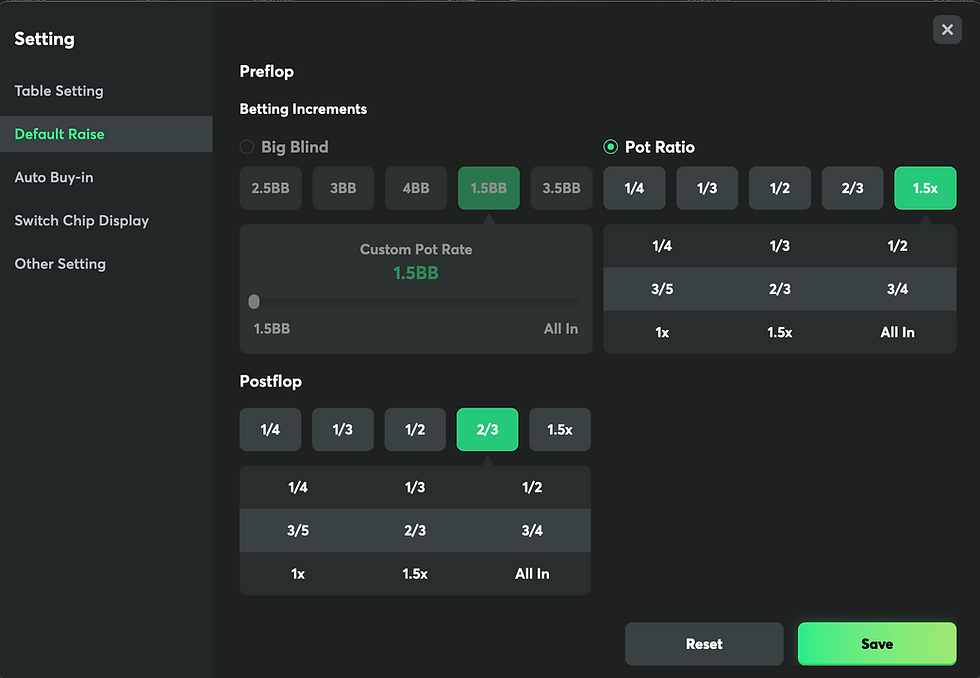
Betting Presets
Another feature I enjoyed was the betting customization.
Instead of manually selecting every bet size, players can configure default actions based on:
Big Blind sizing
Pot percentage
Different postflop streets
Whether you use standard c-bet sizes or have your own preferred strategy, it’s easy to adapt the software to your own game.
It’s exactly the type of feature that makes long sessions more comfortable.
Hand History
BCPoker also includes an integrated hand history viewer.
At the moment, hand histories are stored directly inside the client rather than exported as local text files.
While I’d eventually like to see export functionality added for players who analyse large databases, reviewing previous hands directly inside the software is quick and convenient.
Player Notes
Player notes are built directly into the software.
Instead of relying on external applications or handwritten notes, you can tag opponents and keep your observations inside the client itself.
Combined with the built-in VPIP and PFR information shown in player profiles, it’s another feature that makes the software feel much more complete than many newly launched poker rooms.
🌍 Traffic & Liquidity
This is probably the section readers care about most.
And it’s also where it’s important to be completely honest.
After my first few hundred hands, I don’t think anyone can accurately judge the long-term quality of a player pool.
What I can do is describe exactly what I experienced.
The busiest games were clearly at the micro and lower stakes.
As stakes increased, the number of active tables naturally became smaller.
That’s exactly what I’d expect from a poker room that’s still expanding internationally.
What surprised me wasn’t the amount of traffic.
It was the composition of the games.
Rather than finding tables full of obvious regulars, I encountered a healthy mix of recreational players and competent grinders.
There were plenty of mistakes.
Loose calls.
Questionable preflop decisions.
At the same time, there were also regulars who clearly knew what they were doing.
That balance is encouraging.
One factor that could become increasingly important over the coming years is BCPoker’s connection to the wider BC.GAME ecosystem.
Unlike many standalone poker rooms, BCPoker benefits from being part of one of the largest crypto gambling brands in the industry.
That means recreational casino and sportsbook players already familiar with BC.GAME can naturally discover poker without leaving the ecosystem.
In theory, that’s a much healthier source of liquidity than relying exclusively on existing poker grinders.
The room itself is also growing rapidly, but I prefer judging what I can actually test rather than repeating marketing numbers.
From my own experience, the software already feels capable of supporting a significantly larger player pool than it currently has.
If liquidity continues to grow over the next year, BCPoker could become a very interesting platform to watch.
👍 What I Loved
After spending several hours with the unreleased desktop client, these were the things that impressed me the most.
The software feels finished
This doesn’t feel like an early beta.
If nobody had told me the desktop client hadn’t been released yet, I would have assumed it had already been available for months.
That’s probably the biggest compliment I can give.
The user experience is excellent
Everything responds instantly.
Animations are smooth.
Menus are intuitive.
The software never gets in the way of actually playing poker.
Crypto integration
Depositing with USDC on Polygon took less than a minute.
The welcome bonus was credited automatically.
The cashier supports a wide range of cryptocurrencies across multiple blockchain networks, making it one of the strongest crypto experiences I’ve tested on a poker platform.
Built-in statistics
Having EV, session tracking, VPIP, PFR and player profiles directly inside the client makes the software feel much more complete than many competing platforms.
Even players who don’t use third-party tracking software will appreciate the amount of information already available.
👎 What I’d Like to See Improved
No software is perfect.
And I think it’s important to point out areas where BCPoker can still improve.
The only issue that genuinely stood out during my testing concerns the rebuy system.
Currently, rebuys can only be made in 50 big blind increments.
Personally, I’d prefer complete freedom to choose my own stack size.
It’s a relatively small issue and one that I’d expect to see addressed as the software continues to evolve.
Apart from that, I honestly struggled to find significant criticisms.
For a desktop client that hasn’t even been released publicly yet, that’s an impressive achievement.
⭐ Final Thoughts
After spending several hours testing the unreleased desktop client, my overall impression is very positive.
BCPoker isn’t trying to reinvent online poker.
Instead, it focuses on something that many rooms have struggled to deliver over the last few years: a modern, responsive piece of software that simply works.
The desktop client feels polished.
The cashier is fast.
The interface is intuitive.
The built-in statistics are genuinely useful.
Most importantly, I never found myself fighting against the software while playing.
Of course, software alone doesn’t determine whether a poker room succeeds.
Liquidity will always be the deciding factor.
At the moment, the strongest traffic is still concentrated at the lower stakes, while mid and high stakes remain relatively modest compared to the industry’s largest operators.
However, the foundations are clearly there.
Being part of the wider BC.GAME ecosystem gives BCPoker access to a huge audience of existing casino and sportsbook players, something that many independent poker rooms simply don’t have.
If the player pool continues to grow over the coming months, the quality of the software certainly won’t be the limiting factor.
As someone who tests a large number of poker platforms every year, I can honestly say that this is one of the most polished new desktop clients I’ve used in quite some time.
I’ll continue updating this article once the public version is released and after I’ve put significantly more volume through the games.
Real opinions should evolve with real experience.
Should You Try BCPoker?
If you’re looking for:
A modern desktop poker client
Fast crypto deposits and withdrawals
Built-in player statistics
Smooth multi-tabling
A growing international player pool
Regular promotions, Splash Pots and rakeback
then BCPoker is definitely worth keeping on your radar.
If you’d like to try the platform once the desktop client becomes publicly available, you can register through The Poker Broker using bonus code Pokerbroker.
Registering through my link doesn’t cost you anything extra, but it allows me to provide support if you encounter issues with your account, deposits or promotions, and it also gives me the opportunity to negotiate better long-term deals whenever they’re available.
For the latest promotions—or if you simply want to ask whether BCPoker is the right room for your game—you can also contact me directly on Telegram.
❓ Frequently Asked Questions
Is the BCPoker desktop client available now?
At the time of writing, the desktop client is still being rolled out. The public release for both Windows and macOS is expected soon. This article is based on early access provided by the BCPoker team before launch.
Can I download BCPoker for Mac?
Yes. A native macOS client is being released alongside the Windows version. I personally tested the Mac version throughout this article.
Can I download BCPoker for Windows?
Yes. BCPoker has developed a dedicated Windows desktop client featuring the same interface and functionality as the macOS version.
Does BCPoker support cryptocurrency?
Yes. BCPoker is heavily focused on crypto payments and supports multiple cryptocurrencies across several blockchain networks. During my test, I deposited USDC on Polygon, and the funds arrived in less than a minute.
Is BCPoker part of a poker network?
No.
BCPoker runs on proprietary software rather than licensing a third-party poker network. This allows the development team to introduce new features and improvements much more quickly.
Does BCPoker have rakeback?
Yes.
Depending on your account and promotions, players can receive ongoing rakeback and participate in additional promotions such as Splash Pots, VIP rewards and leaderboard competitions.
If you register through The Poker Broker, I can also help you access the best available long-term deals whenever they’re offered.
Is BCPoker available worldwide?
BCPoker is available in many countries, although availability depends on local regulations. Before registering, it’s always worth checking whether players from your jurisdiction are accepted.
Where can I download BCPoker?
Once the desktop client is publicly available, you can download BCPoker through The Poker Broker and activate bonus code Pokerbroker during registration to claim the current welcome offer


